
A dirty charging port is usually why an iPhone won’t charge, and you can clean it in about 10 minutes with a wooden toothpick, a soft brush, and short bursts of compressed air. The job is easy to medium — easy on the outside, needs care once you’re inside the port. The one thing you must have is a bright light and a magnifier, because you can’t remove what you can’t see.
What you need for an iPhone charging port
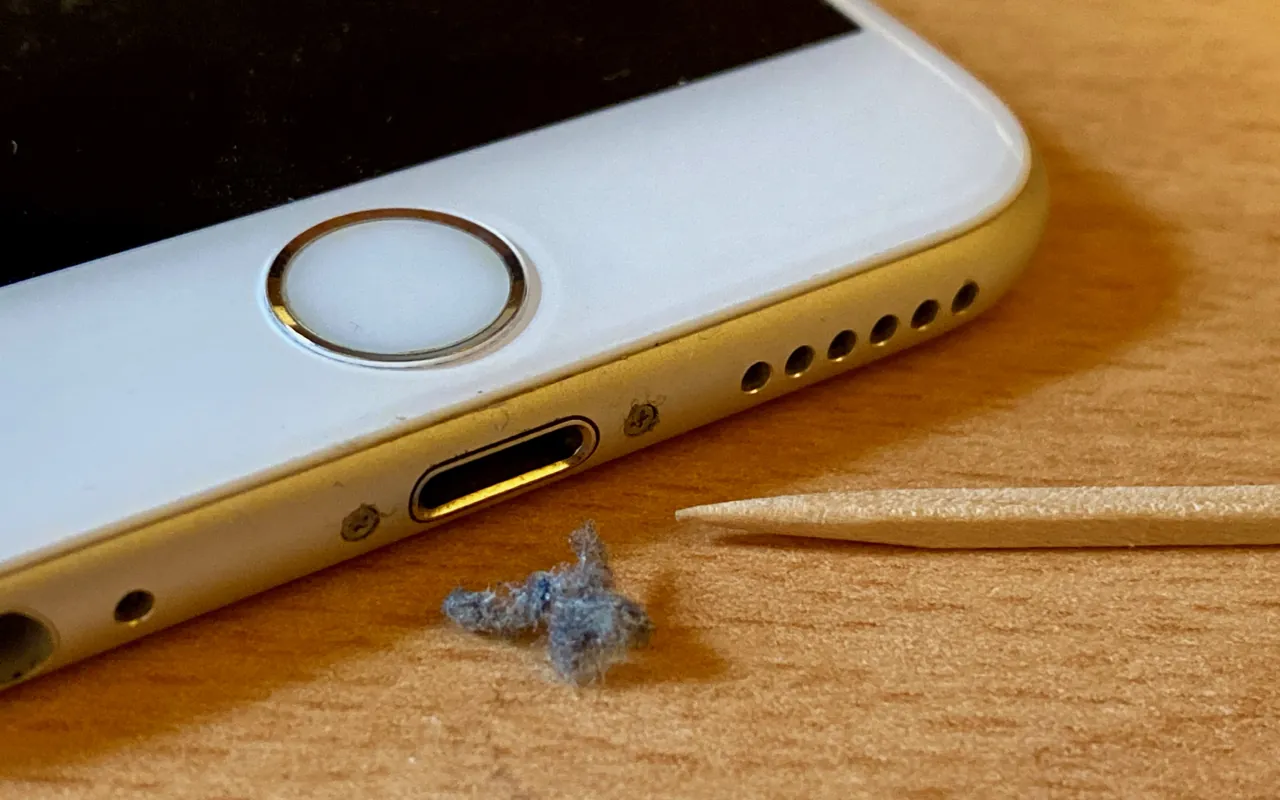
The port is a narrow slot, and lint packs into the far end of it where the pins sit. Everything below is small, cheap, and safe for the metal contacts. Skip anything metal, wet, or sharp.
A wooden toothpick does the lifting, and the flat end matters more than the wood. A pointed tip slides past the lint instead of catching it. If the only pick you have is sharp, snap the tip flat first.
The brush and the air work as a pair, in that order. Brush first to break the lint loose from the walls, then two or three short bursts of air to carry it out. Long blasts push debris deeper toward the pins.
Light and magnification are what turn guessing into seeing. A phone torch held at an angle throws a shadow behind the lint, which makes a thin gray strip obvious. Reading glasses held close can help you focus on the port, though a magnifier works better.
Isopropyl alcohol is for sticky residue only, not for dust. Two drops on the cloth, never into the slot. Lower concentrations contain more water and dry more slowly, so use 70% or higher.
| Item | How much | Why it’s needed | A substitute |
|---|---|---|---|
| Wooden toothpick | 1, flat end | Lifts lint without scratching pins | Plastic dental pick |
| Soft brush | 1, dry | Sweeps loose dust from the slot | Clean dry toothbrush |
| Compressed air | 2–3 short bursts | Blows out what the pick loosens | None — don’t use your breath |
| Bright light | 1, phone torch is fine | Shows you where the lint sits | Desk lamp angled close |
| Magnifier | 1, 2x or more | Lets you see the pins | Reading glasses |
| Isopropyl alcohol | 2 drops, 70% or higher | Dissolves sticky residue | None — don’t swap this |
| Clean cloth | 1, lint-free | Dries the port after alcohol | Paper towel corner |
Before you start cleaning the iPhone port
- Power the phone off first. A powered port with a tool inside it’s the one way this job goes badly. Hold the side button and either volume button until the power-off slider appears, then slide to power off.
- Unplug everything and take the case off. Cases with a port cover hold grit against the opening, and grit is what scratches the pins.
- Look before you dig. Shine the light straight into the slot. If you can see a bent pin, a green or white crust, or liquid inside, stop here — that’s a repair shop job, not a cleaning job.
- Don’t use a pin, a needle, or a paper clip. Metal tools scrape the gold plating off the contacts, and that damage doesn’t come back.
- The step people skip: checking the cable first. A cable with a bent connector or a frayed end mimics a dirty port exactly, and you’ll clean a clean port for nothing.
If your iPhone has had contact with liquid, or the port looks corroded, Apple’s support pages and an Apple Store or authorized service provider are the right next call — not a deeper clean.
Step by step: cleaning the charging port on an iPhone
- Power off and find a bright, flat surface. Set the phone face-up under a lamp, with the port toward you. This takes 1 minute, and you’ll know it worked when you can see the bottom of the slot clearly without a shadow across it.
- Check the cable connector first. Look at the metal end of your Lightning or USB-C cable under the light. If it’s bent, dark, or has a notch worn into it, try a second known-good cable before cleaning anything — if the phone charges on the new cable, the port was never the problem.
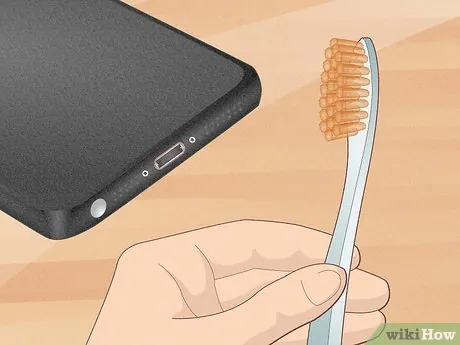
- Brush the opening with the dry brush first. Sweep side to side, not in and out, for about 10 seconds. You’ll know it worked when loose dust flies out and the slot looks emptier than before.
- Brush the opening with the dry brush. Sweep side to side, not in and out, for about 10 seconds. This loosens lint stuck to the walls, and you’ll see grey fluff collecting at the edge of the port.
- Pick out the lint with the flat end of the toothpick. Slide it along the floor of the port and lift, working from one side to the other. Use light pressure only — if the toothpick stops hard against something, that’s a pin, so stop and pull back.
- Repeat the brush, air, and pick steps once. One more round clears the compacted plug of lint that usually sits at the back. You’ll know you’re done when the toothpick comes out clean twice in a row.
- Wipe the port walls with 2 drops of isopropyl alcohol. Put the drops on the cloth, not in the port, and wipe gently around the opening. This removes the sticky residue that lint clings to; wait 5 minutes for it to fully dry before anything goes back in.
- Look inside one last time with the magnifier. The contacts should look even, shiny, and free of fluff. If you still see a grey plug at the back of the slot, go back to step 5 rather than pushing harder.
- Charge the phone for 10 minutes and watch the screen. Plug in the original cable and check that the battery icon shows charging within a few seconds. That’s your proof the port is working again.
- Refit the case and check the cable seats fully. The connector should click in and sit flush with the phone’s edge. If it stands proud by even 1 mm, there’s still something in the port.
How to tell the iPhone port is clean
The clearest sign is a cable that clicks in and sits flush, with the phone showing charging within a few seconds. A clean port also holds the cable firmly — if you can wiggle the plug and feel looseness, something is still in there or the connector is worn.
Look inside with the light again. The floor of the port should show even, shiny metal contacts with no grey or white fluff at the back. If you see a dark plug of lint sitting at the far end, that’s your sign it needs a second round of steps 3 to 5.
A second sign is charging speed. If the phone charges but slowly, or only charges when you hold the cable at an angle, the port is partly blocked or the cable is failing. Try a second cable before you clean again — that check costs nothing and saves you repeating the job.
How much lint builds up depends on where you keep the phone. A pocket with keys and tissues sheds far more fiber than a bag or a desk. Look into your own port with a light every few weeks and let what you see set the schedule, rather than a fixed rule.
If the iPhone port cleaning doesn’t work
| What happened | Why | What to do |
|---|---|---|
| Still won’t charge after cleaning | Cable or charger is failing | Try a known-good cable and wall adapter |
| Cable won’t click in fully | Lint still packed at the back | Repeat the pick step with more light |
| Charging cuts in and out | Connector loose or port worn | Test a second cable, then book a service |
| Port looks green or white inside | Corrosion from moisture | Stop cleaning, see Apple or a repairer |
| Toothpick won’t go in | Bent pin blocking the slot | Don’t force it — needs a technician |
| Phone gets warm while charging | Normal during fast charging | Unplug if it’s hot to the touch |
Two rows are easy to confuse, so check them in order. Swap the cable and adapter first, since that’s the cheapest test and the most common cause.
If a fresh cable charges the iPhone but the old one doesn’t, the port was never the problem. If neither cable works, the port is the likely culprit.
The click test tells you whether the fault is lint or hardware. A cable that seats with a firm click but still won’t charge points to the cable or adapter.
A cable that stops short of the click means something is still in the slot. Work under a lamp and look straight into the port rather than at an angle.
Green or white crust is different from lint, and no amount of picking will fix it. Moisture has corroded the contacts, and scraping them makes it worse.
Book a service appointment and describe what you saw. If the phone is still under Apple’s warranty or AppleCare, say so when you book, because corrosion coverage depends on the cause.
How often to clean an iPhone charging port
Clean the port when you see lint at the back of the slot, and for most people in the US that works out to every 2 to 3 months. That figure assumes a phone carried loose in a pocket and charged once a day. If you keep it in a bag or on a desk, every 4 to 6 months is enough.
Two things move that interval most. The first is what shares your pocket — tissues, receipts, and fabric liners shed far more fiber than a smooth bag. The second is your charging habit: plugging in twice a day pushes lint in twice as fast as a single overnight charge.
Your climate counts too. A pocket in a humid summer clings to grit and holds it against the contacts, so the same phone can need attention sooner in a sticky month than in a dry one. Dusty work — sawdust, drywall, flour — is the other case where the calendar goes out the window. If you come home with dust in your hair, check the port on the same schedule you’d check your pockets.
Don’t clean on a fixed calendar just because it’s been a while. A port cleaned too often gets more chances to be scratched. Shine a light in first, and clean only when you can see something there.
Related guides
- How to Clean Your Android Charging Port Without Damage
- 4 Steps to Clean Your Samsung Charging Port
- How to Clean Mac Charging Port
Frequently asked questions
Can I clean my iPhone charging port with a toothpick?
Yes, a wooden toothpick is one of the safest tools for it. The wood is softer than the gold-plated pins, so light scraping lifts lint without cutting into the contacts. Use the flat end, keep the pressure light, and stop if you feel a hard stop — that’s a pin, not dirt. Never use a metal pin, needle, or paper clip in the port.
Why won’t my iPhone charge even after cleaning the port?
The cable or the wall adapter is the usual cause, not the port. Test a second known-good cable and a different adapter before cleaning again, and check the charging brick for a loose plug or a damaged end. If the phone charges with a different cable, the port was fine. If nothing charges it, book a service with Apple or an authorized provider.
How long does it take to clean an iPhone charging port?
About 10 minutes for the full job, including 5 minutes of drying time if you use isopropyl alcohol. The picking and brushing take 3 to 4 minutes; the rest is checking the cable and watching the phone charge. A quick dry clean with just air and a toothpick takes about 3 minutes.
Is it safe to use compressed air in an iPhone charging port?
Yes, if you use short bursts and hold the can upright. Two or three bursts of about 1 second each, from roughly 4 inches away, are enough. Don’t hold the trigger down or tilt the can, because that can spray liquid propellant instead of air. Never push the straw inside the port.
What happens if I get alcohol inside my iPhone?
A couple of drops on a cloth are fine and evaporate in minutes; a flooded port is not. Alcohol pushed past the contacts can carry lint deeper and reach the internal board. That’s why you put 2 drops on the cloth, never in the port, and wait 5 minutes before charging. If liquid does get inside, power off and let it dry fully.
Does it matter which cable I use after cleaning?
Yes — use a certified cable that fits flush. A worn or uncertified connector can sit loose and fail to make reliable contact. Apple publishes its own guidance on certified Lightning and USB-C cables, and checking your cable against it takes a minute and protects the port you just cleaned.
Can I use a vacuum cleaner on the charging port?
No — skip it. A household vacuum builds static and the plastic nozzle is too wide to control at that size. Compressed air in short bursts does the same job with less risk. If dust keeps coming back, the lint is coming from your pocket, not the vacuum.
How do I stop lint from getting into the iPhone port again?
Cover the phone when it’s in a pocket, and empty the pocket of tissues and receipts. A case with a port plug helps if you work around dust or fiber. Check the port with a light every few weeks and clean only when you see lint — that keeps the contacts protected instead of scrubbing them for no reason.
Conclusion
If charging still fails after you’ve cleared the lint, try a different cable and charger before assuming the worst. You’ll probably find the port was the culprit all along, but if not, it’s worth having Apple or a repair shop take a look.