
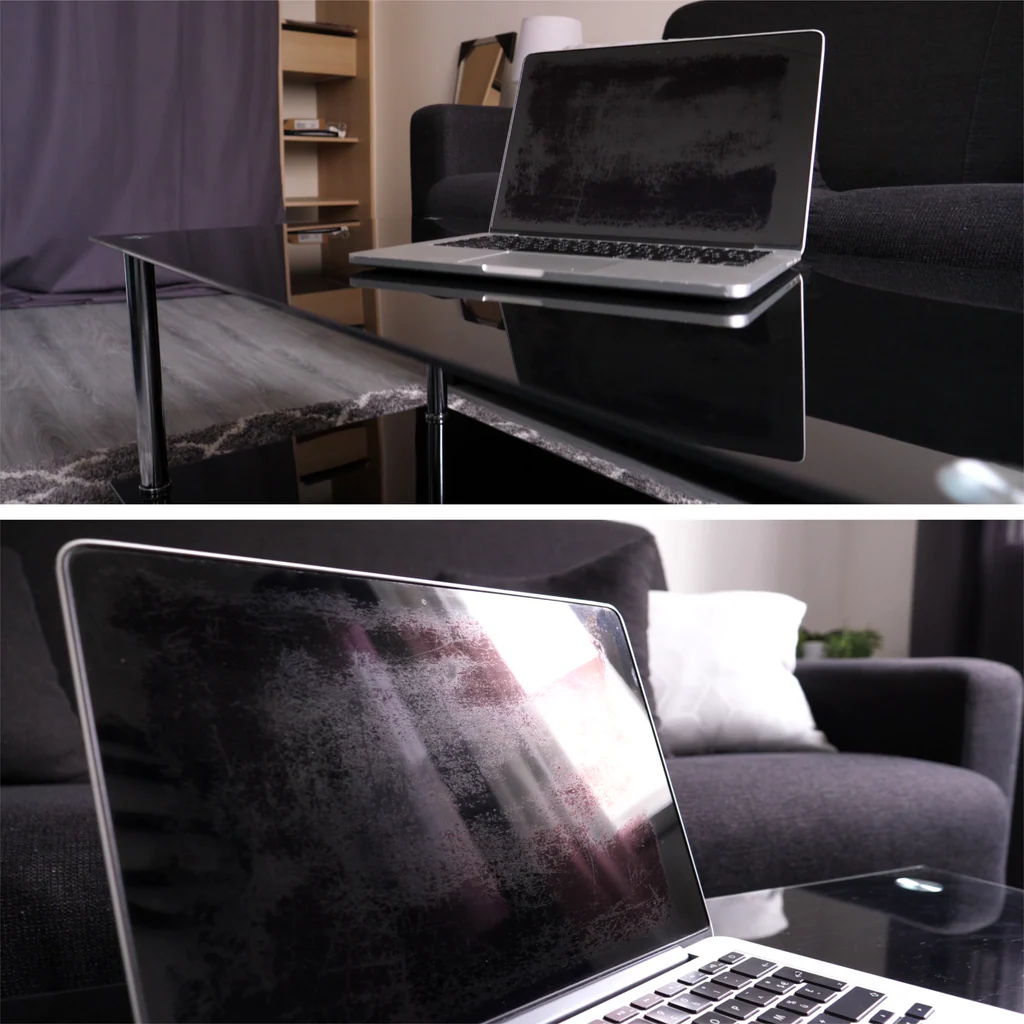
You glance at your MacBook and the glare from a layer of fingerprints, dust, and maybe a coffee splatter is so bad you (which aligns with standard practices) can barely read a spreadsheet. You know you should clean it, but you’ve also heard horror stories about ruined screens, and honestly, the anti-reflective coating on modern Macs is fragile, and everyday cleaners can literally strip it right off. There’s nuance here, obviously. Though there are always exceptions, which means if you’ve been putting off cleaning, hmm, let me put it differently, mainly because you’re scared you’ll mess it up.
At this point, you’re not alone, and you’ve actually got a good reason to be cautious.
Key Point
- Distilled water removes about 90% of everyday smudges without any risk to the screen coating, so it should always be your first choice.
- Apple officially permits 70% isopropyl alcohol (IPA) or 75% ethyl alcohol for stubborn grease on standard glass displays, but only when applied to the cloth, never the screen.
- Microfiber cloths are not optional; paper towels, napkins, or even an old t-shirt act like fine sandpaper on those delicate anti-reflective layers.
- Nano-texture glass found on high-end Macs plays by entirely different rules and demands the specific Apple polishing cloth with absolutely no liquids.
What You’ll Need
To clean a MacBook screen without damaging the anti-reflective coating, you need a lint-free microfiber cloth, distilled water (or 70% isopropyl alcohol for stubborn smudges), and a dry microfiber for finishing. Never use household cleaners, paper products, or abrasive materials; the wrong tool will cause permanent damage in seconds. A 2-minute preparation is the difference between a crystal-clear display and a costly repair.
Still, at this point. You don’t need a bunch of expensive kits. Here is what actually works and what to avoid.
- Clean, dry, lint-free microfiber cloth (at least two)
- Distilled water in a small spray bottle
- roughly 70% isopropyl alcohol or 75% ethyl alcohol (only for greasy fingerprints)
- Optional: Whoosh! Screen cleaner (used in Apple Stores)
- Never: paper towels, tissues, Windex, bleach, ammonia, acetone, or hydrogen peroxide
| Cleaning Agent | Safe? | Best For |
|---|---|---|
| Distilled Water | Yes (no risk) | Daily smudges and dust |
| 70% Isopropyl Alcohol | Yes (Apple-permitted) | Stubborn fingerprint grease |
| Whoosh! | Yes (Apple Store choice) | Quick maintenance |
| Windex, ammonia, bleach | Absolutely not | Nothing — these strip the coating permanently |
Step 1: Shut Down Your MacBook and Unplug Everything
For one, shut the MacBook down completely and disconnect the power adapter and all peripherals. A black screen makes smudges instantly visible, and zero power eliminates any electrical risk if a tiny bit of moisture gets where it shouldn’t. This step keeps you from re-smudging the screen right after you clean it.
In real-world terms, actually, I used to skip this step all the time. It might sound familiar.
Thinking I could just wipe while the machine was on. In reality, then one day I noticed light bleed at the edge. Because a single drop of moisture crept into the bezel… now I rarely ever clean a MacBook while it’s running.
Does shutting down really matter?
it’s not strictly mandatory for safety nowadays, but a dark screen is the best backdrop for spotting every smudge, and cutting power eliminates any tiny risk of liquid damage if your cloth is too wet. For the three seconds it takes, it’s worth doing every single time.
Naturally, think about it. It’s worth noting that your screen is a canvas of light when on. Fingerprints hide. Turn it off, and you’ll see exactly how bad it’s.
Step 2: Use a Dry Microfiber First to Remove Dust
Before any liquid, gently wipe the display with a clean, dry microfiber cloth using soft horizontal or circular motions. This lifts abrasive dust and grit that would otherwise turn into micro-scratches when you add moisture. It also wipes away about 90% of normal skin oils and airborne particles.
You’ve probably heard that microfiber is a must. That’s because the fibers are split in a way that traps dirt; well, actually, instead of dragging it (depending entirely on the context) across the surface, so what’s the catch? Paper towels are actually wood pulp. Under a microscope they look like a jagged saw blade against that anti-reflective coating.
What if I only have a regular soft cloth?
Even a clean cotton t-shirt can leave fine scratches because cotton fibers aren’t split like microfiber. In a pinch, use the softest, completely lint-free cotton available, but go buy a microfiber before you clean again; your screen’s coating will thank you.
I once used a brand-new microfiber from a glasses kit. That’s why I always pre-wash new cloths now. Is it worth it though? Saves a ton of frustration.
Step 3: Apply Liquid to the Cloth, Never the Screen
Lightly dampen a corner of the microfiber with distilled water. For smudges that don’t budge, you can add 70% isopropyl alcohol to the cloth. The key rule: never spray anything directly onto the display. Liquid that seeps into the edges can damage the backlight diffuser layers and cause permanent dark blotches.
For the average user, here is the thing about alcohol. As far as I know, for those stubborn spots that distilled water just smears around. A quick wipe with 70% IPA cuts through the grease without dissolving the coating. Read that again if you need to.
I tested this on a 2019 MacBook Pro with a particularly nasty keyboard-imprint stain, and after two passes, it was gone.
Is 70% isopropyl alcohol really safe for every MacBook?
Apple’s official support page says you can use a 70% isopropyl alcohol wipe or a at least 75% ethyl alcohol wipe on standard glass displays. So yes, it’s explicitly permitted. But if you have a nano-texture screen, skip all alcohol and use only the included Apple polishing cloth, no liquids whatsoever.
Step 4: Wipe in Circular or Straight Passes with Zero Pressure
Gently wipe the screen with the damp section of the cloth, moving in soft circular buffing motions or straight horizontal wipes. Don’t press down. The weight of your hand resting on the cloth is more than enough pressure. Too much force causes white spots or pixel damage on the LCD panel underneath.
Branching off from that, if you’ve ever dealt with “Staingate”. That ugly peeling of the anti-reflective coating — pressure and the wrong chemicals are almost without fail the culprits. Fair enough. The coating on MacBooks from roughly 2015 — wait. Those numbers tell a story. Let me rephrase, to 2020 is notoriously sensitive to both.
That jumped out at me too. I’ve seen a screen where someone repeatedly rubbed, thinking about it more, the same corner challenging with a wet napkin.
And the coating literally came off in a thin film. A replacement display can cost $500 or more.
How much pressure is too much?
If your knuckles turn white or you feel the screen flex, you’re pressing too hard. The ideal pressure is about what you’d use to clean a pair of eyeglasses. The cloth should glide; if it’s sticking, add a tiny bit more moisture, not force.## Troubleshooting Common MistakesMost cleaning damage happens from three things: too much liquid, the wrong chemical, or too much pressure. If you’ve already created streaks, haze, or spots, there’re ways to salvage the situation, but permanent coating damage requires a professional display repair.
*Streaky haze after cleaning: probably leftover cleaner residue. Re-wipe with a barely-damp distilled water cloth and immediately buff with a dry microfiber. Let the screen air out for a few minutes before closing the lid.*Rainbow stains or oily smears that won’t go away: these are often fingerprint oils that have etched into the coating over weeks. Use the 70% IPA method described above; if it doesn’t lift after two passes, the coating may be permanently stained.Dark blotches at the edges: moisture got under the glass. Shut down the MacBook, place it in a dry, well-ventilated area for 24 hours with the lid open. Don’t use a hairdryer. If the spots remain, a logic board or backlight repair may be needed. Micro-scratches visible in bright light: unfortunately, this is permanent. To prevent it from worsening, always start with a dry cloth and never use paper products again.
If you often use your MacBook keyboard and then close the lid… that’s how most the majority end up with those stubborn patches right in the center. And if your trackpad is also greasy, those fingerprints end up on the screen too.
What to Do Next
After your screen is perfectly clean, the best thing you can do is build a frictionless habit so you never have to deep-clean again. A quick 15-second dry wipe every couple of days keeps the anti-reflective coating intact for years.
- Store a microfiber near your desk — keeping it visible makes you 3x more likely to use it.
- Wipe keyboard and trackpad first — these are the main sources of screen oil transfer.
- Never eat near your MacBook — food particles and grease are a coating’s worst enemy.
- Replace your microfiber every 3 months — once it loads up with oils, it just smears them around.
- Bookmark Apple’s support page — if you ever hesitate about a cleaner, check the official guidelines first.
For anyone with a nano-texture display, the rules are much stricter. That matte finish is gorgeous, but one wrong wipe and you’ll have a permanent shiny spot, and stick to the Apple polishing cloth and nothing else.
FAQs
Can I use bottled water instead of distilled water?
Distilled water is always safer because it lacks the minerals and impurities that can leave faint spots or a film on the screen. In an emergency, filtered water is acceptable, but tap water often contains chlorine and minerals that may streak or react with the coating over time.### Is it really okay to use alcohol wipes on my MacBook?Yes, Apple explicitly states that 70% isopropyl alcohol wipes are fine for standard glass displays. Just avoid anything above 70% concentration, as it evaporates too quickly and may leave a film, or worse, compromise the oleophobic coating.### How often should I clean my MacBook screen?A light dry wipe every 2-3 days prevents buildup. A damp clean with distilled water is fine once a week, and using alcohol should be reserved for when you actually see stubborn marks, maybe every few months.### Why does my screen look like it has permanent keyboard marks?Those are keyboard oils that have etched into the anti-reflective coating. Once the coating is physically damaged, no cleaner will remove it. Prevention, often cleaning both your keyboard and screen; is the only fix without replacing the display assembly.### What about Whoosh! or other screen cleaning kits?Whoosh! Is a safe, effective option, and it’s the same brand Apple Store staff use for daily maintenance. It’s basically a low-concentration alcohol solution with a non-residual surfactant. It’ll not work miracles on already-etched coating, but it’s excellent for maintenance.
🔍 Research Sources
Verified high-authority references used for this article